
Online Safety
Mobile-Free School Reminder: We are a mobile-free school. Any pupil who brings a mobile phone to school must hand it in to the class teacher at the beginning of the day and collect it at the end of the school day. This helps ensure a safe, focused and distraction-free learning environment for all pupils.
The internet must be filtered for ALL children at home and on 4G, which means settings on your internet box AND phone need to be age appropriate. You can find out how to do this on your home internet box using the following link
https://www.internetmatters.org/parental-controls/#choose-parental-controls-guide
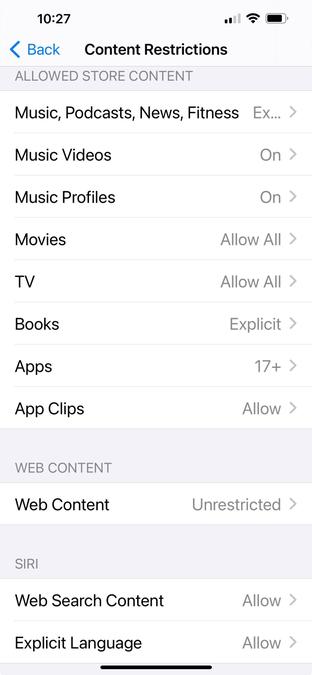
On an iPhone, go to ‘Settings’ – ‘Screen Time’ – ‘Content and Privacy Restrictions’ – ‘Content Restrictions’ (see picture below) where you can alter your child’s phone settings which helps to keep them safe while using 4G. I’m sure all makes of phones will have a similar route to do this. This is an essential step, as all new phones are factory set to adult content.
If you are unable to do this on either your child’s phone or Wi-Fi Box, Mrs Will can help you. Simply bring your child’s phone and your phone (to control your Wi-Fi settings) and come into school with the name of your internet provider.
Making a report
Tips for staying safe online:
- Make sure you keep new online friends strictly online. If someone you don't know asks to be your online friend you must ensure an adult knows about it.
- Know how to use the CEOP Button and how to report it to the CEOP Centre if you are concerned about someone’s online behaviour towards you.
‘App aware’
‘Share Aware’
https://www.nspcc.org.uk/preventing-abuse/keeping-children-safe/share-aware/
NSPCC ‘PANTS’
https://www.nspcc.org.uk/preventing-abuse/keeping-children-safe/underwear-rule/
NSPCC TEAM tips to help keep your child safe online when playing online games:
- Talk to your child regularly about what they are doing online and how to stay safe. Let them know they can come to you or another trusted adult if they’re feeling worried or upset by anything they have seen. You can use our conversation starters to support you when starting these conversations.
- Explore your child’s online activities with your child. Understand why they like using them and make sure they know what they can do to keep themselves safe.
- Agree your own rules as a family when using sites, apps and games. You can use our Family Agreement template to help you get started.
- Manage your technology and use the settings available to keep your child safe.
If you’d like advice and support about keeping your children safe online, call our free O2 NSPCC Online Safety Helpline on 0808 800 5002.
Alternatively, you can make a face-to-face appointment with an O2 Guru in store - you don’t even have to be an O2 customer. O2 Gurus can help you set up parental controls, such as privacy settings, on any device.
Finally, you can visit our online games page to find out more about the risks of online gaming, and how to keep your child safe.
What parents need to know about
- app-store-online-safety-guide-for-parents.pdfPDF File
- grand-theft-auto-online-safety-guide-for-parents (1).pdfPDF File
- nintendo-switch-online-safety-guide-for-parents-carers.pdfPDF File
- online-grooming-safety-guide-for-parents.pdfPDF File
- parental-controls-booklet-2021.pdfPDF File
- ps4.pdfPDF File
- sexting.pdfPDF File
- social-pressures-linked-to-social-media-influencers.pdfPDF File
- tiktok-2022.pdfPDF File
- whatsapp-2022.pdfPDF File
- what-parents-need-to-know-about-fortnite-chapter-2.pdfPDF File
- youtube-2022.pdfPDF File